
In the previous article we looked at how a computer vision system is built internally is the path from a camera frame to a finished decision. The next step is to work out what such a system can actually be used for. At first glance, the list of computer vision tasks looks like a set of unrelated terms: classification, detection, segmentation, identification, tracking, texture analysis. It isn’t. It’s a system with clear internal logic.
In this article we go through these tasks and the basic terminology, so that later articles can build on a shared, unambiguous vocabulary.
A principle for classifying computer vision tasks
The most useful way to classify computer vision tasks is not by algorithm name or by industry, but by one simple question: what does the system actually return as output?
This question immediately brings order, because tasks that look different on the surface turn out to share the same input an image or a video stream and differ only in the format of the answer.
| Output type | Task | Example application |
| One label for the whole image | Classification | Sorting images in any industry where this is needed |
| Label + region on the image | Object detection | Finding defects on a production line, locating specific objects in a video stream |
| Label for every pixel | Segmentation | Separating distinct objects in an image for subsequent classification or identification |
| “Same object / not the same” | Identification and verification | Biometric access, identity checks, answering exactly which object the system is looking at |
| Label for surface or material | Texture analysis | Material quality control in manufacturing, surface analysis during mobile robot navigation |
| Object position over time | Object tracking | Following cargo in a warehouse, tracking movement on a production line, tracking a vehicle in traffic |
| Geometry and structure | Pose estimation, 3D reconstruction | Motion analysis in robotics, manufacturing, security, film production |
| State change over time | Anomaly and event detection | Monitoring the state and relative position of objects in a scene, and triggering a response when specific conditions are detected |
This is not an exhaustive list of every computer vision task. The field keeps evolving, and hybrid formulations keep appearing at its edges. Even so, this table covers most of the tasks which appear commonly in real life and it gives you the vocabulary to state precisely what you need. Scheme below showing basic (fundamental) tasks of computer vision.
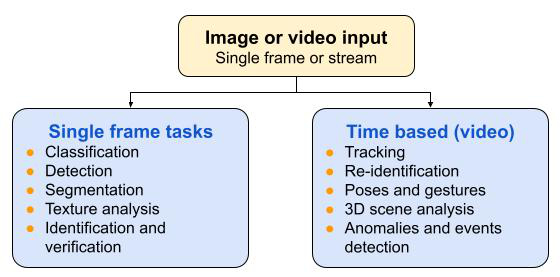
The same table can be collapsed into a simpler, useful split: tasks that can be solved on a single frame (classification, detection, segmentation, texture analysis, identification and verification), and tasks that inherently require a video stream or a sequence of frames (tracking, re-identification, pose estimation, and anomaly detection over time). This split matters even more once we get to the article on real-time video stream analysis, where the difference between “one frame” and “a sequence of frames” turns into an engineering problem rather than just a classification label.
Later in the series we’ll take each of these tasks in turn and go through the methods used to solve it, from classical algorithms to current architectures. Before moving on to methods, though, it’s worth fixing the terminology itself, so nothing gets confused later.
Basic computer vision terminology
Here are three pairs of terms that sound similar but refer to fundamentally different tasks. Being able to tell them apart is one of the most practically useful skills in computer vision work, and it’s exactly where non-technical people on a project most often lose the thread.
Classification, detection, and segmentation
The difference between these three tasks is a difference in the scale of the answer.
Classification
Answers the question “what is this frame showing overall” give a single answer for the entire frame. The system doesn’t say where the object is on the image, only that it’s present.
Object detection
Goes further: it doesn’t just name the object, it also gives its location, usually as a rectangular region (a bounding box). If a frame contains several objects, detection finds and labels each one.
Segmentation
Is more precise still and it assigns a label to every individual pixel of the image rather than to a rectangular region. This gives you the object’s exact outline instead of an approximate box around it.
Practical consequence: if a business requirement is phrased as “find the defect on the part,” you need to clarify immediately whether it’s enough to locate the defective area (detection), or whether you need the defect’s exact outline to measure its size (segmentation). These are two projects of different complexity and cost, even though the requirement sounds similar in both cases.
The image below lets you drag the divider between the raw frame and the segmentation output. Notice that the green and red regions follow the actual outline of the table and the person, not a rectangle around them.
Drag the slider to compare the raw camera frame with the semantic segmentation output. Every pixel belonging to the table gets one class label (green), every pixel belonging to the person gets another (red) – the shape follows the real outline of each object, not a rectangle around it.
Recognition, identification, and verification
Here the difference is of a different kind and it’s about which question is actually being asked of the system.
Recognition
In the narrow sense of classification into known categories answers “which of the known, predefined classes does this object belong to.” The classes are fixed in advance and finite in number.
Identification
Answers “which specific object, among a known set, is this” for example, which specific person in a database this face belongs to. This is an open-set problem: the system must be able to say “this doesn’t match anyone in the database,” rather than simply returning the closest match.
Verification
Is a narrower task answering “is this the same object as that other one, yes or no.” Not “which one is it out of many,” but a comparison between two specific instances.
This distinction matters in any task where you need a precise answer to the question of exactly which object you’re looking at, and whether it’s known to you. A face-based access control system is verification (“does this face match the passport photo or not”), not identification (“which of all the company’s employees is currently in front of the camera”). These are tasks of different complexity, and confusing them at the start of a project regularly results in a method that simply doesn’t fit the actual business problem.
Tracking and re-identification
The next typical tasks working with video and time.
Object tracking
Following a specific object from frame to frame within one continuous observation. The system keeps the object in view even as it slightly changes shape or angle, or is partially occluded by another object.
Re-identification
Solves a different problem: the object disappeared from view area, it left the frame, was fully occluded, or moved into another camera’s field of view and then reappeared. The system needs to determine that this is the same object, not a new one.
The distinction is practically significant in multi-camera surveillance systems: tracking operates within one camera’s field of view, while re-identification is needed to stitch an object’s trajectory together as it moves between cameras. These are two different engineering problems, usually solved with different methods and different levels of accuracy.
Poses and gestures
Pose estimation asks a different question than detection or segmentation: not “where is the object” but “how is it arranged in space.” The output is a set of key points like joints, landmarks, skeletal points and each with its own coordinates, rather than a single label or outline. This is what makes gesture recognition, motion analysis, and pose-driven interfaces possible: a bounding box tells you an object is present, key points tell you what it’s doing.
As example how machine sees human hand you can use widget below. On widget below Drag any joint below and watch what happens to the dashed bounding box versus the coordinates underneath it. The box barely changes meaning no matter how you pull it — it just marks an area. The point coordinates change meaningfully, which is why gesture and pose recognition use key point vectors instead of bounding boxes.
Drag any joint. The dashed bounding box updates its size, but it never tells you which finger moved or how the hand is posed – it is just the outer extent. The 21 point coordinates below it are the actual pose: each one changes independently, which is why keypoint vectors, not bounding boxes, are used for gesture and pose recognition.
3D scene analysis
Most of the tasks covered so far operate on a flat, two-dimensional image. 3D scene analysis adds the dimension that's missing from a single photo: depth, spatial structure, and the geometric relationship between objects in a scene. This is what a system needs when a decision depends not just on what's visible, but on how far away it is and how objects are positioned relative to each other — a requirement that becomes unavoidable once vision is used to guide movement, covered later in this series.
Anomalies and events detection
Some tasks aren't about identifying a single object at all, but about noticing when something changes. Anomaly and event detection tracks the state of a scene over time and flags deviations from what's expected. A machine running outside its normal parameters, an object appearing where it shouldn't, a sequence of actions that doesn't match a known pattern. The object itself may already be well understood; what matters here is the moment something about it stops being normal.
Image normalization and tracking of moving objects aren't textbook abstractions. These are areas I worked on directly back in the late 1990s and early 2000s developing algorithms for real time image frame normalization in recognition tasks, tracking and mobile robot navigation. We'll come back to both topics in detail in the block of articles on vision-based control systems, and look at what has changed in the more than twenty years since.
It might look like all of this is a matter of vocabulary rather than engineering practice. In reality don't, it directly shapes the problem statement, which in turn determines everything that follows in a project: what data needs to be collected, how it should be labeled, which model architecture to choose, and which metrics to use for evaluation. If the task is stated imprecisely at the outset say, the business needs verification but the team designs a classifier over a fixed list of classes. The result may formally "work" without solving the actual problem. This is one of the most common reasons a finished computer vision system fails to meet expectations: not because the algorithm is bad, but because it solved the wrong problem.
That's why the first step in any serious computer vision project isn't choosing a model, method, or algorithm it's stating the task precisely, in the terms covered in this article.
What's next
We've mapped out computer vision tasks and sorted out the terms that get confused most often. Next in the series, we'll take these tasks one at a time and go through the methods used to solve them, from classical algorithms to current deep learning architectures, along with quality metrics and common implementation mistakes.
Next article: classification and object detection — the methods historically used for these tasks, and what they look like today.
If you need help with implementation of Computer Vision systems, contact me via SOFYCOD corporate web site Contact Author, and I can consult you about any questions related to development and implementation of Computer Vision systems.