
Computer vision has long ceased to be a topic of science fiction. It recognizes faces on phones, detects defects on a manufacturing line, helps a car stay in its lane, and monitors the movement of people at an airport. But behind this ubiquity lies a question that rarely finds a clear answer: how does a machine actually “see”?
In this article, the first in a series about computer vision, we will review the fundamental structure of any computer vision system: the path from a camera’s raw frame to the specific decision that this system outputs. This is the foundation without which subsequent articles about recognition, detection, tracking, and motion control will be a collection of terms without an understanding of where they come from.
What a Machine Sees
Let us start from the very beginning. For a human, an image is a picture: a face, a tree, a road. For a machine, an image is a matrix of numbers. Each pixel is one or several cells of this matrix containing brightness values for each color channel.
A standard camera outputs an image in the RGB space, which has three channels: red, green, blue. This is convenient for displaying on a screen, but not always convenient for analysis. For example, for tasks where the color of an object is important regardless of lighting (say, separating a ripe fruit from an unripe one or finding a specific shade on a conveyor), engineers often convert the image into another color space such as HSV (hue, saturation, value) or Lab. In these spaces, color and brightness are separated, and the task becomes technically simpler.
The first and important thesis of the article: choosing the method of image representation is already an engineering decision, not a technical formality. It is made based on the specific task, and it determines how simple or complex it will be to solve everything that follows.
Simple example to show how color models works
Raw frame: grass in the background, an orange marker on the right. This is exactly what the camera hands the system – an RGB matrix, no preprocessing applied yet.
What this widget does: it renders a small scene (grass with an orange marker) directly in the browser, converts every pixel from RGB to HSV in real time, and shows the three stages of classical object detection: the raw frame, the resulting binary mask, and the final bounding box drawn around the detected marker.
How to use it: click through the three buttons above the canvas to step through the pipeline. On stages 2 and 3, drag the two Hue sliders to widen or narrow the color range the threshold accepts. Watch how a range that's too wide starts picking up parts of the grass as "marker," and how a range that's too narrow misses the marker entirely.
It is worth expanding this thought right away: a camera is not the only source that gives a machine an "image" in a broad sense. Lidar, for instance, instead of a pixel matrix, gives a point cloud in space, where each point has coordinates and a distance to the object. The format is different, but the task is the same: this is data that needs to be processed, features must be extracted from it, and objects must be recognized simply by other methods that take into account the specifics of spatial rather than color representation. We will return to this in more detail in articles about motion control systems, where a camera and lidar often work in tandem.
The Path from Frame to Decision: The Computer Vision System Pipeline
Any computer vision system, from the simplest to an industrial one, is structured as a sequence of stages. A convenient analogy is how a person looks for a familiar face in a crowd: first the eye catches silhouettes, then attention focuses on facial features, then the brain compares these features with memory and issues a verdict "know" or "do not know".
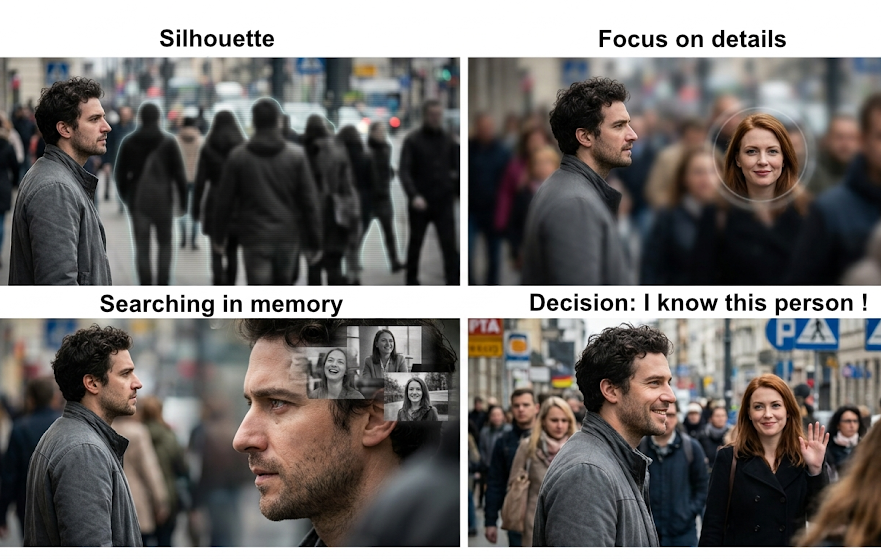
This picture is an AI Generated
A computer vision system goes through a similar path, only explicitly and step by step, as shown in the diagram below.
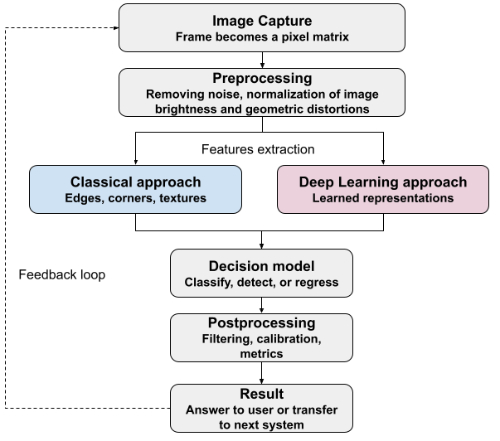
1. Image Capture
Everything begins with a camera, and here the limitations of the entire system are already established. Resolution determines how many details are available for analysis. Frame rate determines how fast the system manages to react to changes (this will become critical when we talk about video streams and real time control systems). Shooting conditions: illumination, camera angle, lens distortion shape what all subsequent stages will have to work with. An important practical point: if the camera is installed poorly or shoots in conditions for which the system was not designed, no algorithm in subsequent stages will completely compensate for this. A good computer vision system begins with thought out capture, not with a "powerful neural network".
2. Preprocessing
A raw frame almost never goes directly to analysis. First, it needs to be brought to a predictable form: remove noise, correct lighting, normalize the scale and orientation of the object. This is the stage that rarely makes it into marketing presentations, but it is often what determines whether the system will work in real conditions or only on neatly selected demo examples. A revealing example: a model trained and tested in a laboratory under uniform lighting can sharply lose accuracy in a workshop with uneven light or glare from metallic surfaces simply because the preprocessing stage was not designed for such conditions.
3. Feature Extraction
This is the stage where the main part of "seeing" occurs: transforming pixels into information with which one can reason: whether there is an edge, a corner, a characteristic texture, or a shape in the image. Here lies the key boundary around which the entire further series of articles will be built:
- Classical approach. The engineer determines which features to look for: edges, corners, gradient histograms, local texture patterns, and writes an algorithm that calculates them. This is transparent, predictable, does not require a large volume of data, but is limited by what a person is able to formulate explicitly in advance.
- Deep learning approach. The model finds which features are important on its own, learning from a large number of examples. This removes the limitation "a person must know in advance what to look for", but in return requires data, computational resources, and reduces the transparency of the decision, namely it becomes harder to explain why the model made that specific decision.
Neither approach is unconditionally better, and the choice depends on the task, the volume of available data, the requirements for strictness of analysis and decision making, and resources for implementation. In traditional mechanical engineering and safety critical systems, classical methods are often still justified precisely because of predictability. We will return to this comparison in every subsequent article in the series because this opposition is systemic, not accidental.
4. Decision Making Model
The features extracted in the previous step enter a model that issues the final verdict: which class the object belongs to, where exactly it is located in the image, whether it is the same object as in the previous frame. This can be a simple rule, a statistical classifier, or a neural network: the principle is one: features at the input, decision at the output.
5. Postprocessing and Quality Assessment
The result of the model is rarely a ready answer for business in its pure form. It needs to be filtered (discarding decisions with low confidence), calibrated (ensuring that "95% confidence" of the model actually corresponds to 95% accuracy in practice), and brought to a format understandable to the next system or a human. Here lies another practical nuance: the quality of a computer vision system cannot be evaluated by whether it "worked nicely on a couple of examples". Metrics exist: precision, recall, noise immunity, type I and type II errors, and without them, talk about system quality remains a conversation at the level of impressions.
6. Feedback and Retraining
A computer vision system is not an artifact that is set up once and forgotten. Conditions change: different equipment, another camera angle, new types of objects. A well designed system assumes a feedback loop: collecting new data, labeling complex cases, periodic retraining or fine tuning of the model.
Fundamental Difference: Demo Mode and Real Conditions
This is a separate topic that deserves attention already in the first article, because this is where expectations and results most often diverge. A model that showed impressive accuracy on a test dataset can sharply lose quality when encountering real conditions: different lighting, other camera angles, objects that were not in the training sample. The difference between the data on which the model was trained and the data it sees in real operation is one of the main reasons why computer vision projects demonstrate mediocre results immediately after launch or even disappoint. In practice, it looks like this: 80% of typical cases are solved relatively quickly and predictably, while the remaining 20% such as rare angles, nonstandard lighting, edge cases determine most of the cost and time of the entire project. This is not an exception, but a pattern that any serious computer vision system encounters when moving from prototype to deployment, especially if the system must work in real conditions where the number of parameters that can be influenced is at its maximum.
What Next
In this article, we covered what stages any computer vision system consists of, from frame capture to decision making and feedback. This is the framework onto which, in subsequent articles of the series, we will overlay specific tasks: how object classification and detection are solved, how segmentation, identification, tracking, texture analysis work, and at the end of the series we will reach vision based motion control systems, including mobile robots and drones.
Next article: Tasks of Computer Vision: we will break down what types of tasks this field solves in general and what the fundamental difference between them is.
If you need help with implementation of Computer Vision systems, contact me via SOFYCOD corporate web site Contact Author, and I can consult you about any questions related to development and implementation of Computer Vision systems.